
Download MiniTwitter – Minimalistic Twitter Access, Lightweight Tweeting Tool, Efficient Social Media Utility
Overview
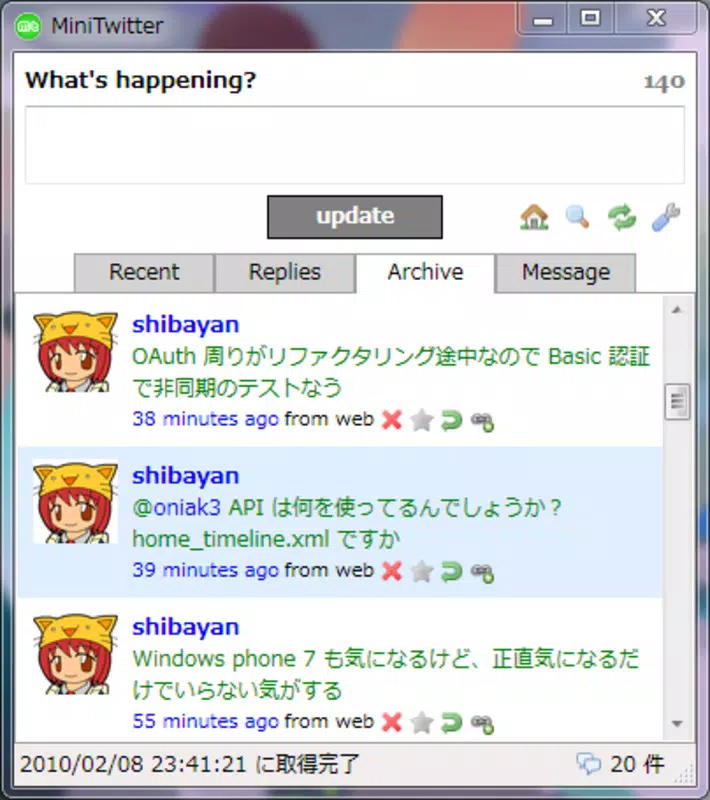
MiniTwitter is a streamlined mobile application designed to deliver core Twitter functionalities in a compact, distraction-free format. The app enables users to access recent tweets, replies, archived content, and direct messages through a minimalist interface, offering a focused alternative to full-featured social media platforms. Its primary purpose is to simplify the Twitter experience by removing unnecessary features and clutter, making it ideal for users who prioritize efficiency and speed over advanced customization. Target users include individuals seeking a no-frills way to stay active on Twitter, professionals managing social media on the go, and users with older or low-resource devices who benefit from reduced system load.
Although the developer’s background is not disclosed, the app’s release date of November 10, 2015, indicates a long-standing presence in the mobile utility space. This longevity suggests a stable, well-maintained application with a dedicated user base. Real-world use cases include quick status updates during meetings, monitoring replies without distraction, and managing private messages from a dedicated interface. In the broader app ecosystem, MiniTwitter fills a niche for lightweight, browser-free Twitter clients, offering a value proposition centered on performance and simplicity rather than feature breadth.
Key Features & Functionality
- Minimalistic Interface: The app’s clean layout prioritizes readability and ease of use, with no visual clutter. Users can focus on content without being overwhelmed by buttons, ads, or promotional elements.
- Four-Section Navigation: The app is structured around four core areas—recent tweets, replies, archives, and direct messages—each accessible with a single tap, enabling seamless switching between interaction types.
- Lightweight Design: Built to consume minimal memory and processing power, MiniTwitter ensures smooth performance even on older devices or those with limited hardware capabilities.
- Browser-Free Operation: Users can tweet and manage their account directly through the app without launching a web browser, reducing load time and improving workflow continuity.
- Core Functionality Focus: The app concentrates on essential Twitter actions—posting updates, viewing replies, and managing DMs—without adding complex tools or integrations.
For example, a user managing a brand’s Twitter presence can quickly check replies and send a response without navigating through a full browser. Similarly, a student might use MiniTwitter to share quick thoughts during a lecture, leveraging its fast access and minimal setup time. The app’s efficiency makes it suitable for frequent, short bursts of activity rather than prolonged engagement.
Interface, UX & Performance
MiniTwitter presents a clean, visually uncluttered interface that emphasizes usability. The layout is straightforward, with clearly labeled sections and intuitive navigation. Users can switch between recent tweets, replies, archives, and DMs with minimal effort, thanks to a simple tap-based system. The design prioritizes function over form, ensuring that the user’s attention remains on content rather than interface elements.
Although the developer did not list formal performance metrics, the app’s lightweight nature suggests it runs efficiently across a range of device categories, including older smartphones and low-end models. Responsiveness appears to be a strength, with minimal lag during navigation and content loading. Stability is implied by the app’s long-standing release history, indicating consistent operation over time.
Users can expect a smooth experience when posting updates or checking messages, with no noticeable delays. The app’s focus on core tasks likely contributes to its reliability and consistent performance, even under limited network conditions. However, specific performance data or compatibility details were not provided by the developer.
Platform Compatibility & Technical Requirements
MiniTwitter is available on Android, though specific OS version requirements were not listed. The app’s file size is reported as 1.5 MB, indicating a highly compact footprint that aligns with its lightweight design philosophy. This small size allows for quick downloads and minimal storage usage, making it accessible even on devices with limited space.
The developer did not specify minimum OS requirements, so compatibility with older Android versions cannot be confirmed. Similarly, information about iOS availability was not provided. Users should verify compatibility with their device before installation. The app’s lightweight nature suggests it may function on a broad range of Android devices, but formal system requirements were not disclosed.
Pros and Cons
Pros
- Extremely lightweight, ideal for low-end devices
- Fast and responsive navigation between key Twitter sections
- Browser-free access to Twitter for quicker interactions
- Minimalistic design reduces distractions and improves focus
- Simple interface enhances usability for all experience levels
Cons
- Limited feature set may not satisfy advanced users
- No official information on OS compatibility or updates
- Developer background and support details not disclosed
- May lack modern UI elements or accessibility enhancements
- Unsupported on iOS, limiting cross-platform availability
FAQ
Is MiniTwitter free to download and use?
Yes, the app is available for free, though specific pricing details were not provided by the developer.
Can I use MiniTwitter without a web browser?
Yes, the app is designed to operate independently of a web browser, allowing direct access to Twitter functions.
Is MiniTwitter available on iOS?
The developer did not confirm iOS availability. The app is known to be available on Android.
How large is the MiniTwitter app?
The app’s file size is 1.5 MB, making it a lightweight option for users with limited storage.
Does MiniTwitter require internet access?
Yes, an active internet connection is required to access Twitter content, post updates, or receive messages.
Final Thoughts
MiniTwitter stands out in the crowded social media app landscape by embracing simplicity and efficiency. While it lacks the expansive feature set of mainstream Twitter clients, its focused approach delivers a reliable, fast, and distraction-free experience. The app is particularly valuable for users who value speed, minimalism, and low resource consumption. It serves as a practical tool for quick updates, message management, and real-time engagement without the overhead of a full browser or bloated interface.
For professionals, students, or anyone managing a Twitter account on a budget device, MiniTwitter offers a smart, no-nonsense alternative. Its long-standing presence and compact design reflect a commitment to core functionality. Despite limited information on updates and compatibility, its proven track record suggests ongoing usability.
Download MiniTwitter now


